
City of Derby
Academy
Curriculum
Homework
What do we mean by ‘homework’?
Homework includes any work completed by students outside of normal lesson time:
- Work completed at home or in the library before and after school
- Work completed at home during normal school hours when a student is absent e.g. due to illness
- Work completed when the school is closed to students (weekends and holidays)
- Work completed outside of school (‘remote learning’)
- Work completed outside of school hours using a smart phone or laptop (‘online learning’)
Why do we think homework is important?
CODA’s vision is “improving the life chances of all students”. We believe that completing work outside of lessons helps to improve students’ life chances by developing their independence, self-discipline and resilience.
Homework also provides students with opportunities to:
- Practice, consolidate and extend what they have learned in lessons
- Prepare for assessments and examinations in advance (rather than ‘cramming’ the night before)
- Develop their digital literacy skills by accessing and completing work ‘online’
What are CODA’s homework expectations?
CODA does not have a formal homework timetable for all subjects. Teachers may sometimes set specific homework tasks, and students are expected to complete these by the deadline provided. Teachers will also direct students to revise and prepare for tests and assessments throughout the year.
Maths – MathsWatch (compulsory homework)
In December 2025, we informed parents that Maths would be setting compulsory homework. Each week, students will be assigned tasks based on the topics covered in lessons, and these will remain active for two weeks. Once the deadline has passed, rewards and sanctions (including detentions) will be issued accordingly. Please read the letter below for the full details (this was the letter sent out December 2025).
English and Science - Sparx Reader and Sparx Science
- Sparx Reader homework will be set every Wednesday and due in the following Wednesday.
- Sparx Science homework will be set every Thursday and due in the following Thursday.
- Approximately 20-30 minutes per week on each platform. Pupils can choose to do more if they wish.
- Pupils will earn rewards and recognition for completing their homework regularly and demonstrating excellent effort.
Other subjects
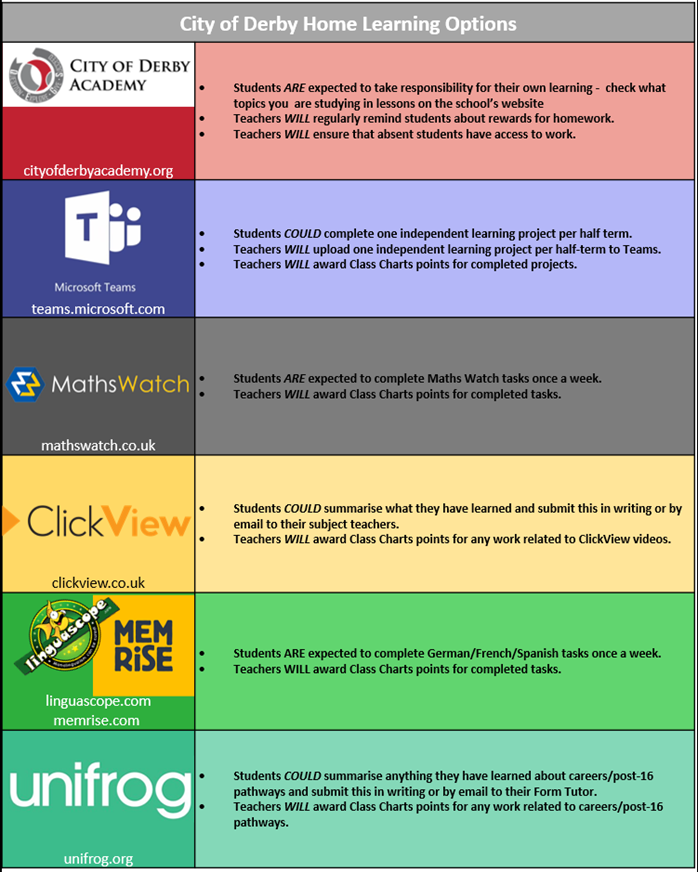
Most of the time, students are encouraged to take responsibility for their own learning and to follow the CODA Homework Code and complete extra work in their own time.
Support
To check what topics they are studying, students can visit https://www.cityofderbyacademy.org/information/curriculum/
For help with logging into Maths Watch and Teams, students can also visit http://www.cityofderbyacademy.org/remote-learning/
Students should go to https://portal.office.com/ and login with their school email address and password. They can email any teacher directly using their school Outlook email account, or email ICTsupport@citofderbyacademy.org if they need help with logging on.
To watch ClickView videos students can visit https://online.clickview.co.uk/login and use their school email address and password.
To access Unifrog careers advice go to https://www.unifrog.org/sign-in and use their personal login.
If students have forgotten their usernames and passwords, they can speak to the following staff:
Office – ICT technicians
Maths Watch – Maths teacher
Linguascope, Memrise or Language Gym – French/German/Spanish teacher
Unifrog – Form Tutor
Students and parents/carers can also ask the following staff for help:
How can parents/guardians help their child with homework?
Please ensure that your child has access to a digital device that can access the internet, such as a laptop, tablet or smartphone. If you have any problems with computer or internet access, then please let us know as we may be able to help you. The school is investing a lot of money in buying Google Chromebooks for some students to borrow whilst they are a student at CODA. Your child may be eligible for one of these or other forms of IT support.
Please encourage your child to follow the CODA Homework Code, and to access online learning when they are absent from school.
You could also talk to your child about what they are learning e.g. by asking them what they know, or asking them to explain or demonstrate things. Talking about learning will help them to remember more and make more progress.
 Visit our Trust website
Our Family of Schools
-

Castle View Primary School
-

Chellaston Academy
-

City of Derby Academy
-

Djanogly City Academy
-

Djanogly Northgate Academy
-

Djanogly Sherwood Academy
-

Djanogly Strelley Academy
-

Kensington Junior Academy
-

Hilltop Primary Academy and Nursery
-

Laceyfields Academy
-

Langley Mill Academy
-

Morton Primary Academy
-

QEGS Ashbourne
-

Springfield Academy
-

Springfield Junior School